Generating OG Images at Build Time with Satori
How I built a custom OG image generator with Satori, Resvg, and procedural ASCII art. Why social previews matter, and how to automate them.
When you share a link on Twitter, Discord, or Slack, that little preview card is often the difference between someone clicking through or scrolling past. The previews come from Open Graph (OG) images. Most developers either ignore them entirely or reach for a generic template.
I wanted something different for this site: unique, branded images that match the brutalist aesthetic, generated automatically. Here’s how I built it.
01 // Why OG Images Matter
Open Graph protocol was created by Facebook in 2010 to control how URLs appear when shared. Everything supports it now:
- X uses
twitter:image(falls back toog:image) - Discord renders rich embeds from OG tags
- Slack unfurls links with preview images
- LinkedIn, iMessage, Telegram - all of them
The impact is measurable. Links with custom OG images see 2-3x higher click-through rates compared to those with generic favicons or no image at all. For a blog, that’s the difference between your post being read or buried.
<!-- The essential OG tags --><meta property="og:title" content="Your Post Title" /><meta property="og:description" content="A compelling excerpt..." /><meta property="og:image" content="https://yoursite.com/og/post.png" /><meta property="og:image:width" content="1200" /><meta property="og:image:height" content="630" />The standard dimensions are 1200x630 pixels, a 1.91:1 aspect ratio that displays well across all platforms.
02 // The Architecture
My approach generates all OG images at build time rather than on-demand. Here’s why:
| Approach | Pros | Cons |
|---|---|---|
| Build-time | Zero runtime cost, static hosting, CDN cached | Rebuild needed for changes |
| On-demand (Edge) | Dynamic content, no rebuild needed | Cold starts, compute costs, complexity |
| Manual | Full control over design | Doesn't scale, tedious |
For a blog with infrequent posts, build-time generation is the clear winner. The images are generated once, deployed to Cloudflare, and served instantly.
The stack:
- Satori - Converts React JSX to SVG (by Vercel)
- Resvg - Converts SVG to PNG (Rust-based, fast)
- gray-matter - Parses MDX frontmatter
- Custom ASCII generator - Procedural art seeded by post title
03 // The Template Design
Each OG image follows a consistent “foiled card” design with emerald accent ribbons:
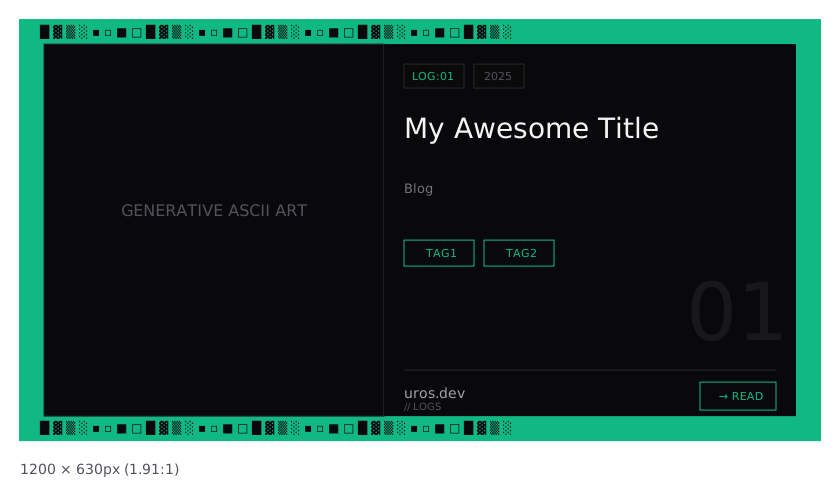
The left panel holds procedurally generated ASCII art. The right panel shows the post metadata. Every post looks different without going off-brand.
04 // Satori: JSX to SVG
Satori is Vercel’s library that renders React JSX to SVG. It skips the browser entirely and implements a subset of CSS Flexbox directly. Incredibly fast, but the constraints are real:
import satori from 'satori';
const svg = await satori(  <div    style={{      display: 'flex',      width: '1200px',      height: '630px',      backgroundColor: '#09090b',      fontFamily: 'JetBrains Mono',    }}  >    <div style={{ fontSize: '48px', color: '#f4f4f5' }}>      {title}    </div>  </div>,  {    width: 1200,    height: 630,    fonts: [      {        name: 'JetBrains Mono',        data: fontBuffer, // Must be TTF, not WOFF2        style: 'normal',        weight: 400,      },    ],  });
Key limitations to know:
- No CSS Grid - Flexbox only
- No pseudo-elements - No
::beforeor::after - TTF fonts only - WOFF2 not supported
- Explicit dimensions - Everything needs width/height
- No
gapshorthand - Use individualrowGap/columnGap
05 // Procedural ASCII Art
The most interesting part is the ASCII art generator. Rather than static images, I generate unique patterns seeded by the post title:
function hashString(str: string): number {  let hash = 0;  for (let i = 0; i < str.length; i++) {    const char = str.charCodeAt(i);    hash = ((hash << 5) - hash) + char;    hash = hash & hash;  }  return Math.abs(hash);}
class SeededRandom {  private seed: number;
  constructor(seed: number) {    this.seed = seed;  }
  next(): number {    this.seed = (this.seed * 9301 + 49297) % 233280;    return this.seed / 233280;  }}
Deterministic randomness. The same title always produces the same pattern. With some vibe coding I’ve implemented 8 different pattern generators:
- Dense Matrix - Digital rain effect with binary streams
- Geometric Blocks - Overlapping rectangles with block characters
- Flowing Waves - Sine waves with
═ ─ ~ ≈characters - Data Cascade - Vertical falling data streams
- Noise Field - Perlin-like noise with varying density
- Glitch Bands - Horizontal corruption bands
- Crosshatch - Intersecting diagonal lines
- Scatter Plot - Clustered point distributions
Much of it was inspired by shader powering background
The pattern is selected based on hash % 8, so each post gets a unique but reproducible visual:
export function generateAsciiArt(  width: number,  height: number,  seed: string,): string[] {  const hash = hashString(seed);  const patternType = hash % 8;
  switch (patternType) {    case 0: return generateDenseMatrix(cols, rows, seed);    case 1: return generateGeometricBlocks(cols, rows, seed);    // ... etc  }}
06 // The Build Script
The generation script runs at build time. It reads every MDX file and creates the corresponding image.
The output goes to public/og/, making them available at /og/post-slug.png.
07 // Connecting to Astro
In my base layout, I wire up the OG tags with a fallback to the homepage image:
---interface Props {  title: string;  description?: string;  ogImage?: string;}
const { title, description, ogImage } = Astro.props;const siteUrl = Astro.site?.origin || "https://uros.dev";const imageUrl = ogImage || `${siteUrl}/og/home.png`;---
<head>  <meta property="og:title" content={title} />  <meta property="og:description" content={description} />  <meta property="og:image" content={imageUrl} />  <meta property="og:image:width" content="1200" />  <meta property="og:image:height" content="630" />
  <!-- Twitter needs its own tags -->  <meta name="twitter:card" content="summary_large_image" />  <meta name="twitter:image" content={imageUrl} /></head>
Blog posts pass their specific OG image:
<BaseLayout title={post.title} description={post.excerpt} ogImage={`${siteUrl}/og/${post.slug}.png`}/>08 // Testing Your OG Images
Before deploying, always test your images:
- opengraph.xyz - Preview across all platforms
- Twitter Card Validator - Official Twitter testing tool
- Facebook Sharing Debugger - Clear Facebook’s cache
- LinkedIn Post Inspector - Check LinkedIn rendering
Common issues to watch for:
- Image not updating - Platforms cache aggressively. Use cache-busting query params or their debug tools.
- Wrong dimensions - Some platforms crop differently. Test on each.
- Text cut off - Keep titles under ~60 characters for safe display.
09 // Performance Considerations
Since images are generated at build time:
- Build duration - Each image takes ~200-500ms. For 10 posts, that’s 2-5 seconds.
- Bundle size - PNGs are ~50-150KB each. Consider WebP if size is critical.
I still need to stop the script regenerating every image on every build. Incremental generation, by hashing frontmatter and comparing against previous builds, is on my TODO list. For now, regenerating 5-10 images in a few seconds isn’t a big deal.
10 // The Result
Every post on this site now has a unique, branded preview image that:
- Includes procedural ASCII art seeded by the title
- Shows post metadata (tags, date, description)
- Works across all social platforms
The whole system is ~500 lines of TypeScript. It runs in seconds and requires zero manual intervention. Share any post from this blog and see for yourself.
If you’re building a blog or portfolio, investing time in OG images is one of the highest-ROI improvements you can make for discoverability. Automate it once and you never think about it again.